Structure & Display
Structure in Charm is represented as a tree of nodes. Each node has an address and a size, representing an Extent within the document’s address space. A single root node spans the document’s entire address space, which cannot be deleted, but it can be resized to resize the document.
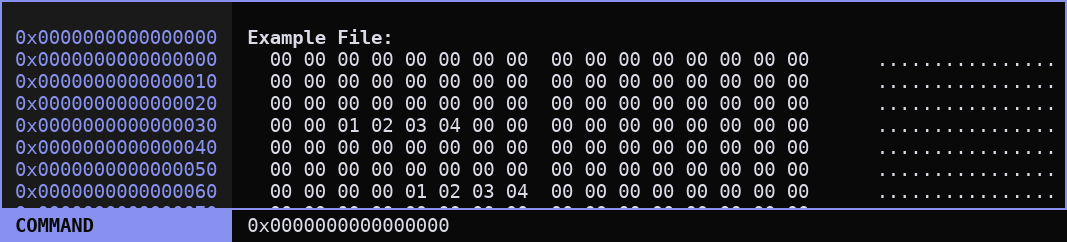
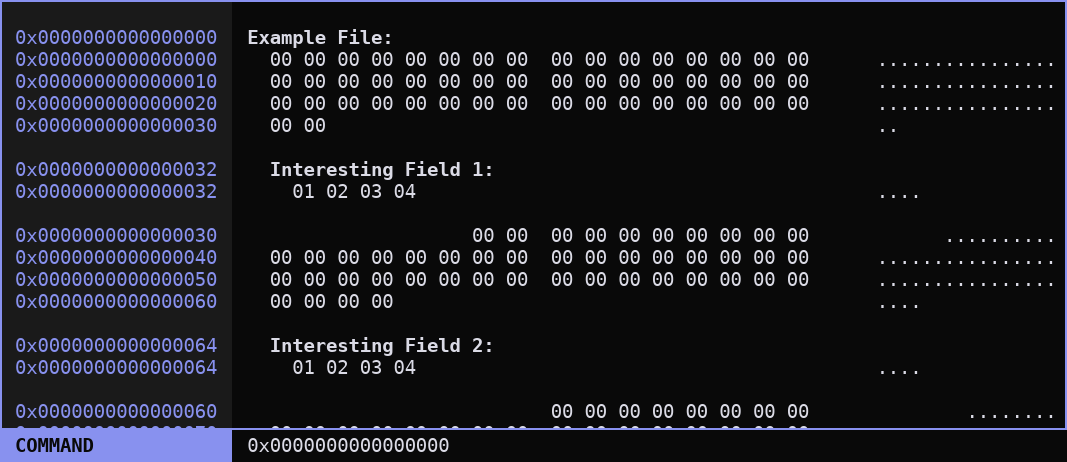
Nodes can have child nodes, which can be used to outline the structure of data within the document and alter how it is displayed. Creating a node that covers some data means that that data no longer “belongs” to the parent node, and is broken out of the normal typesetting flow such that it can be displayed separately before returning to the normal typesetting flow of the parent node. These can be nested as deep as you like.
Properties
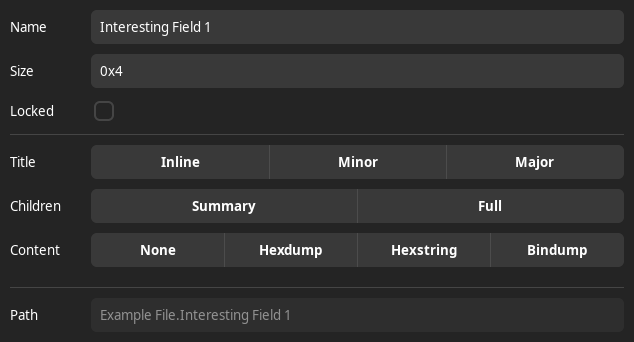
Each node has properties, which can alter how data that belongs to that node is displayed, how the title is displayed, or how children are represented. These can be edited using the property editor, shown below. The property editor can edit properties of many nodes at once, if multiple are selected in the tree view.
Title Display
- Inline
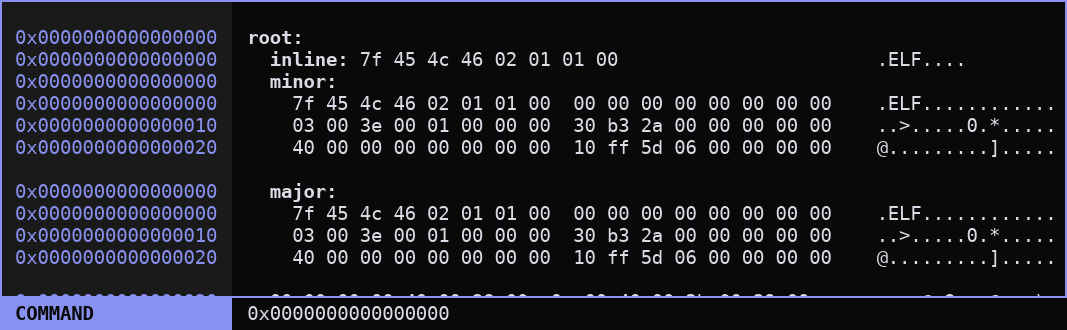
Title is displayed on the same line as the first line of content. This is ideal when there are many small fields within a structure where the data will comfortably fit on the same line as the title and the vertical space can be saved.
- Minor
Title is displayed on a separate line before the content, but with no additional whitespace. Useful for sub-structures and longer fields that won’t fit on a single line.
- Major
Title is displayed on a separate line before the content, and includes additional blank lines before the title and after the end of the content to give more visual separation. Best for top-level structures or particularly important fields that need to stand out from their surroundings.
Children Display
- Full
All children are displayed as normal, including titles, and their presence affects data shadowing.
- Summary
The node’s entire tree of children are displayed on a single line using a special JSON-style syntax. Non-leaf nodes do not display any data, even if it is not shadowed. This is intended for displaying small structures with two or three fields and hiding padding.
Note
The Summary children display mode is not finished and is missing several UI interactions when compared to Full mode.
Content Display
- None
Data belonging to this node is skipped completely and replaced by
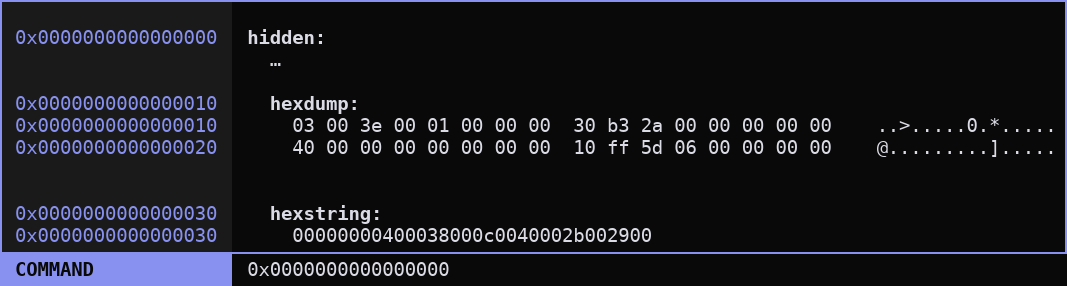
.... This is most useful for hiding padding data between defined children such as archive members aligned to specific addresses or partitions within a flash dump. Note that in the image above, because the root node’s content display is None, the data from0x0-0x10and0x20-0x30is skipped, but the...still allows it to be selected.- Hexdump
Data is displayed in classic hex editor style, as columns of bytes with spaces between them and an asciidump representation on the side. The amount of data displayed per line can be changed, as well as the position of an extra space between columns (the “gutter”).
- Hexstring
Data is displayed on a single line as a continuous string of hexadecimal bytes. Currently limited to 16 bytes.
- Bindump
Data is displayed in binary words. The amount of data per line can be changed, as well as the size of each word. Bits within a word are ordered from MSB (most significant bit) on the left to LSB on the right.
Node Childhood Rules
The children must be completely contained within the size of their parent; children’s end addresses may not exceed the end address of their parent (and, transitively, any of their ancestors).
A node’s children must appear in order (their start addresses must be monotonically increasing), but their extents may overlap with each other either partially or entirely.
Note
This may cause data to get repeated as it is displayed once for each overlapping child, and can appear as if the output is backtracking upon itself. This is intended behavior and allows the same data to be displayed under multiple different representations, which may be useful when analyzing polyglot files or exploit payloads.
A child may also end at a lesser address than one before it, in which case the data immediately following that later child will be displayed by the parent, even though that data also belonged to a previous child. In other words, address in the listing may jump backwards if a child begins at a lower address than the one before it ended, but addresses will not skip fowards.